| You Are 40% Left Brained, 60% Right Brained |
 Left brained people are good at communication and persuading others. If you're left brained, you are likely good at math and logic. Your left brain prefers dogs, reading, and quiet. The right side of your brain is all about creativity and flexibility. Daring and intuitive, right brained people see the world in their unique way. If you're right brained, you likely have a talent for creative writing and art. Your right brain prefers day dreaming, philosophy, and sports. |
Sunday, May 11, 2008
Are You Right or Left Brained?

Thursday, May 1, 2008
Etsy Postcards
These are not my design, but I'm posting them here in the event they are no longer available on Etsy. Three of them are currently available here: http://team.etsy.com/downloads.html .
These are the direct links, which are valid now, anyways:
It's a link that is not found on Etsy, but used to be.
These are the direct links, which are valid now, anyways:


Friday, April 11, 2008

Monday, March 10, 2008
What Days of the Week Are Best For Sales?

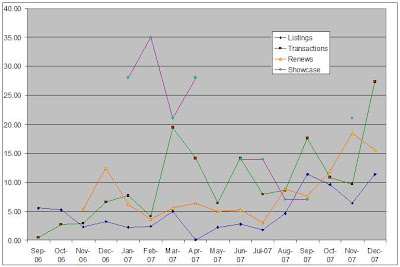
I've updated my spreadsheet that examines your seller Etsy Statement information!
Answers these questions, for your own shop, with NO MANUAL ENTRY of any information.
It uses the information already provided for you by Etsy. Just Copy and Paste.
(Assumes you have and know Excel.)
>What day of the week is better for MY SHOP for sales?
>Do Showcases work?
>Is renewing increasing my sales?
>Does listing new items help sales?
Examines the above questions in $ and # formats.
>How does the overall money I pay a month on Etsy relate to my number of transactions?
--------------------------------
I'm asking for a few testers of this before I offer it in my shop. Just drop me an Etsy convo with your email address and I'll send it your way
Thanks for your help!
Tuesday, February 26, 2008
Metal Price Calculator
With the cost of silver what it is, I needed a way to figure the price of what I needed. Here's a snippet of my spreadsheet. What you can't see is also a calculator of how many headpins per foot, how many feet needed based on this. And then the price of sheet metal per inch.
I just plug the current price of metal in to the top and the rest is calculated for me. Or I enter amount of feet desired and the cost is there.
It's saved me a lot of time and questions!
If you'd like a copy of this, just drop a comment here or send me an Etsy conversation with your email address. :)

I just plug the current price of metal in to the top and the rest is calculated for me. Or I enter amount of feet desired and the cost is there.
It's saved me a lot of time and questions!
If you'd like a copy of this, just drop a comment here or send me an Etsy conversation with your email address. :)
Thursday, January 10, 2008
Riveting Abalone
Over a year ago, I made this design and decided to make a go of it again. There's a lot of work that goes into this prior to bending the tabs and if one of those babies snapped off, all that work would be for naught. It ends up a unique and sturdy design. One of my favs. :)

Monday, January 7, 2008
Examine Your Etsy Billing Information - Cheap!
This is now available in my shop CHEAP! I began offering it as a PIF, but realized I'd go broke paying .20 with each one. So, it's only a little over a buck!
Instructions for adding your Statement Data to Etsy_Statements_Summarization.xls. From now on, I'll call this the Statements File.
PC Instructions only. I'm sorry, I'm not familiar with Mac. This assumes you have Microsoft Excel 95 or greater.

Instructions for adding your Statement Data to Etsy_Statements_Summarization.xls. From now on, I'll call this the Statements File.
PC Instructions only. I'm sorry, I'm not familiar with Mac. This assumes you have Microsoft Excel 95 or greater.
- Open your new Statements File,
- Login to Etsy
- Click on Your Etsy
- Under the Money section, click on Your Etsy Bill (https://www.etsy.com/billing_main.php)
- Click on the month you wish to begin with. I'll choose Dec 2007
- Scroll down to the bottom of the page and click on the link "Download this entire montly statement as a CSV file".
- You'll receive a choice to Open or Save. Choose Open.
- Select OK to any other prompts you may receive until the data opens up in Excel.
- Now you should be in Excel, with the data viewable.
- Select all of the data. One way is to hold down the Ctrl key, while pressing A.
- Copy the data. One way is to hold down the Ctrl key, while pressing C.
- Now navigate to the new Statements File.
- Click on the Dec tab.
- Click on the cell A11 and paste the data. One way is to hold down the Ctrl key, while pressing V.
- Voila! The data is automatically totaled on the Dec tab and on the Totals Tab.
- Continue on with the other months.
Subscribe to:
Posts (Atom)


